


I write this because site speed and real user signals now shape search outcomes. Google finished its core update rollout by March 27, 2025, and it favors pages that deliver fast, helpful experiences. I focus on clear, actionable metrics that reflect how users feel when they visit your page.
I track these metrics because they show more than raw speed. They measure load, visual stability, and responsiveness — factors that cut bounce rates and lift conversions.
Every second matters: studies show a one-second delay can reduce conversions by up to 20%. With the right tools and a focused report, I can pinpoint where your website slows down and how to fix it.
My goal is simple: help you tune performance so users stay, engage, and convert. That also helps your pages climb in search results and keeps your site competitive.
Key Takeaways
- Google’s update (completed March 27, 2025) rewards fast, user-friendly pages.
- These metrics measure real user experience, not just technical tricks.
- Small speed gains can boost engagement and conversion rates.
- Use reliable tools and reports to find and fix slow pages.
- I’ll show practical steps to improve performance and ranking.
Understanding the Core Web Vitals Importance for Modern Websites
These standardized signals translate how a visitor experiences a page into measurable data I can act on.
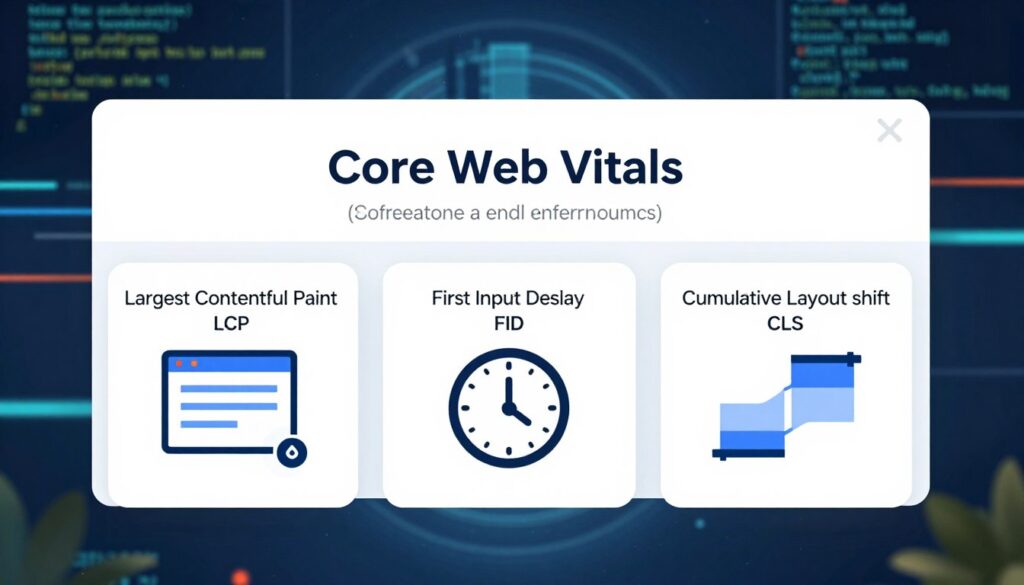
I explain that core web vitals are a set of Google metrics designed to show real user experience. They isolate three areas: loading performance, ease of interaction, and visual stability.
While developers use these metrics to debug technical issues, I find they help site owners spot bottlenecks fast. Each metric points to where content delivery or page code slows a visitor down.
In short, they turn vague complaints into clear fixes. By measuring load times, interaction delays, and layout shifts, you can prioritize changes that truly improve performance and keep users on your website.
- Standardized measurement: a consistent way to assess real visits.
- Actionable feedback: shows where a page needs work.
- Better outcomes: faster pages lead to higher engagement and conversions.
Why User Experience Remains the Heart of Google Search
Search updates now reward pages that make visitors feel confident and engaged from the first click. I see this in every algorithm change: Google nudges the web toward helpful, usable pages.
I track core web vitals because they signal whether a page treats users well. These metrics measure load, responsiveness, and visual shifts so you can fix what annoys visitors fast.
When a site delivers a smooth experience, users stay longer and interact with content more. That boosts conversions and sends positive signals to search.
- I believe a focus on visitors aligns your pages with ranking signals.
- I recommend regular audits to keep your website tuned to these metrics.
- Result: better performance, lower bounce rates, and happier users over time.
“A fast, stable page is where useful content meets real people.”
Decoding Largest Contentful Paint for Loading Performance
Largest Contentful Paint tells me how quickly the biggest visible piece of a page appears. This metric zeroes in on the moment users see the main content, not just the first byte or a tiny element.
Defining LCP
Largest contentful paint measures the render time of the largest element in the viewport. That can be an image, a video poster image, a background image, or block-level text.
In practice, I look for which element finishes last during the initial load and call that the LCP. It gives a clear, user-centric view of how fast the page feels.
Ideal Loading Thresholds
A good target is 2.5 seconds or less for largest contentful paint. Keep LCP under that number to reduce bounces and improve user experience.
- The largest contentful paint focuses only on the visible viewport.
- I audit images and poster frames first; they often cause long takes.
- Removing render-blocking scripts and optimizing images usually cuts LCP time.
“Make the biggest element load fast — that single change shapes the first impression.”
Mastering Interaction to Next Paint for Better Responsiveness
Interactive latency shapes how visitors judge a page the moment they click or type. I focus on the single metric that replaced fid in March 2024: interaction to next paint (INP).
INP measures the delay from a user’s input until the screen visually updates. A score of 200 milliseconds or less is the target I aim for to keep users happy.
Reducing Input Latency
I work on how the browser handles clicks and keypresses. I trim long tasks, defer nonessential scripts, and optimize event handlers so the page responds fast.
- Why it matters: lower latency means smoother user experience and higher engagement.
- Action steps: break long scripts, prioritize interaction code, and monitor real-user INP data.
- Goal: achieve INP ≤ 200 milliseconds to reduce frustration and abandonment.
“A responsive page keeps people interacting and converts intent into action.”
| Issue | Cause | Fix |
|---|---|---|
| Slow click response | Long-running JS tasks | Split tasks, use requestIdleCallback |
| Delayed keypress feedback | Heavy event listeners | Debounce, optimize handlers |
| Visual update lag | Render-blocking work | Defer nonessential rendering, use compositing |
Ensuring Visual Stability with Cumulative Layout Shift
A stable layout makes content feel polished and easy to use from the first glance.
Cumulative Layout Shift (CLS) measures unexpected layout shifts that move elements after a page renders. A score under 0.1 is the target I aim for to keep users confident while they read and interact.
Unexpected layout shift can cause misclicks and break the user experience. I look for images, banners, and late-loading elements that push other pieces around.
- I recommend reserving space for ads and images so the layout stays put.
- Assign sizes or use placeholders to avoid shifts caused by late content loads.
- Keep a close eye on CLS in real-user data to spot problematic elements.
Why this matters: high cumulative layout shift deters users and lowers conversions. My process is to identify shifting elements, fix their sizing, and re-test until the layout feels steady.
“Preventing layout shifts protects trust and helps visitors complete actions without surprise.”
Exploring Additional Performance Metrics Beyond the Core

To understand real lag, I inspect extra timing events that sit between the first paint and full interactivity. These measures reveal which scripts or elements cause long takes and slow perceived performance.
First Contentful Paint
First Contentful Paint (FCP) measures time until the first piece of content appears. I use 900ms as an optimal target because users judge speed from that initial visual cue.
Time to Interactive
Time to Interactive (TTI) measures when a page becomes fully usable. I aim for about 2400ms so users can reliably tap, type, or scroll without encountering frozen UI.
Total Blocking Time
Total Blocking Time (TBT) measures the delay between FCP and TTI. A TBT under 300ms shows the page remains responsive while other work finishes.
Why these matter: they are not replacements for core web vitals but add depth. I find that tracking FCP, TTI, and TBT helps me spot heavy JavaScript and render-blocking elements fast.
- I use these metrics with other tools to map performance bottlenecks.
- They let me prioritize fixes that shorten lag and improve user experience.
- Combine them with real-user data to build a practical optimization plan.
“Measure the pauses between paints and interaction — that’s where unnoticed delays hide.”
How Core Web Vitals Influence Ecommerce Conversion Rates
A small gain in loading speed often creates a big bump in conversions for online stores.
Deloitte found that improving site speed by just 0.1 seconds can lift retail conversion rates by 8.4%. I use that stat to show why performance matters for checkout, product pages, and search visibility.
In practice, shoppers expect fast, stable pages. If a product image or button loads slowly or shifts, users leave. I recommend focusing on these metrics because better scores keep visitors engaged and reduce abandonment.
- Faster load times increase trust at checkout and lift revenue.
- Most customers leave after about three seconds, so speed is a competitive edge.
- Optimized pages also perform better in search, bringing more qualified buyers.
My experience is clear: stores that prioritize performance see higher conversion rates and happier users. Treat these measurements as part of your business strategy, not just a technical task.
“A faster, steadier page turns visits into purchases.”
The Role of Personalization in Website Speed
Personalized pages build loyalty, but they can also add unseen delays that hurt real users.
I see this every time a site adds dynamic recommendations or heavy tracking. McKinsey reports that 71% of consumers expect tailored experiences, so personalization is no longer optional.
Balancing Dynamic Content with Speed
Personalization works best when it respects metrics that measure load and responsiveness. I watch how each personalized element changes the page’s load time and interaction scores.
Too many scripts, late-loading images, or real-time calls can drag down core web vitals and the page experience. I recommend limiting synchronous calls and using async patterns.
Smart caching and edge delivery let you keep tailored content without sacrificing performance. For example, the Nostra AI Edge Delivery Engine uses 310+ edge servers to cut latency for personalized fragments.
- I throttle noncritical personalization until after the main content renders.
- I collect only needed first-party data and batch requests to reduce round trips.
- I use edge caching to serve personalized blocks fast to returning users.
| Personalization element | Common cause of delay | Fast fix I use |
|---|---|---|
| Real-time recommendations | Server round trips and heavy computation | Edge caching + async rendering |
| User-specific images | Large assets loaded on first view | Progressive loading and size hints |
| Behavioral scripts | Blocking main thread | Defer scripts, optimize handlers |
“You can deliver tailored experiences and keep pages fast — but only if you design personalization around performance.”
Why These Metrics Still Matter in the Current Search Landscape
Measurable experience signals remain the best lens for judging a site’s real-world performance.
Core web vitals still act as the gold standard for how fast and steady a page feels to users. After the March 2025 update, Google doubled down on intent, authenticity, and E‑E‑A‑T, and that favors pages that deliver both excellent content and smooth delivery.
I watch these signals because they map directly to user behavior. Faster pages keep users engaged, reduce drop-offs, and improve conversion rates. That makes them a practical part of any SEO plan.
Tracking these metrics is not just a technical audit. It shows how your content performs under real conditions and guides fixes that move the needle in search results.
| Why it matters | What it reflects | Quick action I recommend |
|---|---|---|
| Better rankings | User satisfaction and speed | Optimize images, reduce blocking scripts |
| Lower bounce rates | Perceived responsiveness | Prioritize interactive code, trim heavy scripts |
| Higher trust | Stable layout and content clarity | Reserve space for media, set size hints |
My advice: keep measuring, align performance with intent, and treat these metrics as part of your long-term SEO strategy.
Essential Tools for Measuring and Reporting Performance
Before you fix anything, get reliable data. I start with tools that convert timing signals into clear reports. That helps me see which page elements cost time and which quick wins raise scores.
Using PageSpeed Insights
PageSpeed Insights gives a straightforward report with actionable recommendations for mobile and desktop. I run it to identify heavy images, render-blocking scripts, and slow server responses.
Its lab data points are useful for reproducing issues. The field data shows real users’ results so I can measure user experience after changes.
Leveraging Google Search Console
Google Search Console offers a detailed view of core web vitals across your site. I use its reports to spot pages that fail thresholds and to track progress over time.
Combine GSC with Lighthouse, WebPageTest, and the Chrome User Experience Report for a fuller picture. Using several tools helps me validate fixes and ensure the site improves in search and in real user metrics.
- Tip: schedule regular audits and save each report so you can compare before-and-after results.
Prioritizing Technical Improvements for Maximum Impact
Start by fixing the issues that cause the biggest delays — that gives the fastest returns.
I use PageSpeed Insights to sort faults by priority. The report marks items with red, orange, or grey icons so you can see what hurts your score most.
Focus first on red-triangle problems. Those usually create a poor experience and drag down your page metrics and search visibility quickly.
Ignore minor suggestions at the start. Fixing a few high-impact items will improve speed and responsiveness faster than tackling every low-risk alert.
I build a simple roadmap from the data in my tools. That plan lists the critical fixes, the expected gains, and who on the team will own each task.
- Prioritize red items in PageSpeed Insights.
- Tackle render-blocking scripts and heavy images first.
- Measure after each change to validate gains.
“Fix what moves your metrics and users will reward you with better engagement and conversions.”
Strategies for Implementing Long-Term Performance Gains
Sustained performance relies on routines that catch regressions before users do. I build a plan that pairs regular checks with clear ownership so issues get fixed fast.
Start small: set a monthly audit cadence for your site and a lightweight sprint to resolve the top three blockers. This keeps pages healthy as content and features grow.
Tools like the Nostra product suite cut setup time. I can implement its no-code solution in about 30 minutes and see immediate loading improvements for many pages.
- I recommend scheduled monitoring and triage to prevent surprises.
- Train your team to treat performance as part of content delivery.
- Prioritize fixes that raise search and conversion signals quickly.
| Action | Frequency | Expected benefit |
|---|---|---|
| Automated site audits | Weekly | Catch regressions early |
| Performance sprints | Monthly | Improve page speed and loading |
| No-code acceleration (Nostra) | One-time + ongoing | Quick wins with minimal dev effort |
| Team training | Quarterly | Culture of performance |
“A proactive approach beats reactive fixes; keep measuring, keep improving.”
Conclusion
A clear performance plan turns measurements into steady gains that users notice. Focus on the core web web vitals — LCP, INP, and CLS — to keep your page fast, stable, and responsive.
These metrics are not just technical checks. They shape user experience, lift conversions, and help your website perform better in search and ranking results.
I urge you to use the tools I discussed to monitor real users, fix the heaviest elements, and measure gains in seconds or milliseconds. Every improvement protects your brand and makes content easier for users to enjoy.
FAQ
Why are these performance metrics still critical for search ranking?
What exactly does Largest Contentful Paint measure?
How do I reduce cumulative layout shifts on my site?
What is the difference between First Contentful Paint and Time to Interactive?
How does interaction latency affect conversions on ecommerce sites?
Which tools should I use to measure these metrics?
Can personalization hurt page speed, and how do I balance it?
What are acceptable thresholds for Total Blocking Time and input delay?
How often should I run performance reports and audits?
Which fixes deliver the biggest impact quickly?
How do I interpret field data versus lab data?
Are browser reports and search console metrics reliable for monitoring trends?
What role does image loading play in perceived speed?
How do I fix layout shifts caused by ads or third-party embeds?
Will improving these metrics measurably affect SEO and traffic?

Dr. Silas Thorne is a data scientist and SEO architect with over 15 years of experience in algorithmic analysis. Specializing in search intent modeling and technical optimization, he founded freetded.com to bridge the gap between complex big data and actionable marketing strategies. When he isn’t auditing backlink profiles, Dr. Thorne contributes to global digital forensics research.